The first thing I noticed when I used the product was that the bristles were too hard. It was uncomfortable to use and your gums took a beating. I thought to myself, for 9 bucks for a pack of 8 it’s worth overlooking. I thought that the bristles would soften up after a while.
It softened alright after a while, but then parts started falling off. I almost choked on a small piece of metal that came off the toothbrush head. Immediately, the unit stopped working altogether, no vibrations or rotating head. I replaced it with a new one, and after a couple of uses, the same thing happened. Something snapped inside the unit, then nothing. What’s worse is that you can’t even return the product “due to health and safety regulations”, as stated in the Kogan website.
Stay away from this crap product. You have been warned. My review for this product is 4/10.
While it is not possible to create a database link using LDAP credentials, it is possible to lookup the TNS details through LDAP, which will allow you to create a database link using the TNS entry. Firstly, we need to successfully connect locally to the database using our known LDAP credentials e.g. below:
Database Service: TEST_DB_SERVICE
Database User: DBUSER
Database Password: SECRETPASSWORD
Directory Servers: (OID.GLB.IN.SAMPLEDOMAIN.COM.AU::3131)
Default Admin Context: “dc=in,dc=SampleDomain,dc=com,dc=au”
Directory Server Type: OID
To do this we need to configure our computer.
1. Configure the Oracle Client files in the $ORACLE_HOME/network/admin directory.
ldap.ora: (create new file) DIRECTORY_SERVERS = (OID.GLB.IN.SAMPLEDOMAIN.COM.AU::3131)
DEFAULT_ADMIN_CONTEXT = "dc=in,dc=SampleDomain,dc=com,dc=au"
DIRECTORY_SERVER_TYPE = OID
Note: the double-colon before the port number (“::3131”) is not a typographic error. It is required syntax for the Secure LDAP protocol. sqlnet.ora: (put this line first in the file) NAMES.DIRECTORY_PATH = (LDAP,TNSNAMES)
2. Check to see if you can log in using the supplied schema, password and connection.
Here’s an example of logging in as DBUSER with SQL*Plus and the provided password: sqlplus DBUSER/SECRETPASSWORD@TEST_DB_SERVICE
3. If you can successfully connect then open up a command prompt window, and execute the command tnsping TEST_DB_SERVICE to determine the TNS entry that we require:
C:\work\source\svn\dmt>tnsping TEST_DB_SERVICE TNS Ping Utility for 32-bit Windows: Version 11.2.0.2.0 - Production on 11-FEB-2
015 11:02:06 Copyright (c) 1997, 2010, Oracle. All rights reserved. Used parameter files:
C:\oraclexe\app\oracle\product\11.2.0\server\network\admin\sqlnet.ora Used LDAP adapter to resolve the alias
Attempting to contact (DESCRIPTION = (ADDRESS = (PROTOCOL = TCP)(HOST = ssdb0401
n01-oravip.in.sampledomain.com.au)(PORT = 1521))(ADDRESS = (PROTOCOL = TCP)(HOST = ss
db0401n02-oravip.in.sampledomain.com.au)(PORT = 1521))(LOAD_BALANCE = yes)(CONNECT_DA
TA = (SERVER = DEDICATED) (SERVICE_NAME = DF0014D_A_S_O_01.in.sampledomain.com.au)))
OK (90 msec)
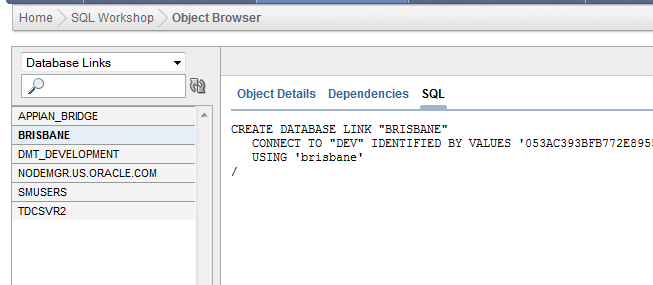
4. Now we got everything we need to create the database link:
CREATE DATABASE LINK "TEST_APP"

CONNECT TO "DBUSER" IDENTIFIED BY "SECRETPASSWORD"

USING '(DESCRIPTION = (ADDRESS = (PROTOCOL = TCP)(HOST = ssdb0401n01-oravip.in.sampledomain.com.au)(

PORT = 1521))(ADDRESS = (PROTOCOL = TCP)(HOST = ssdb0401n02-oravip.in.sampledomain.com.au)(PORT = 1521))(LOAD_BALANCE = yes)

(CONNECT_DATA = (SERVER = DEDICATED) (SERVICE_NAME = DF0014D_A_S_O_01.in.sampledomain.com.au)))'

/
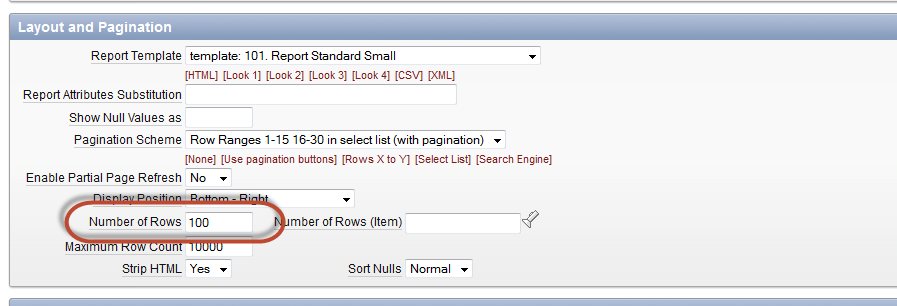
So you create what appears to be a simple classic SQL report region. It contains a lot of rows so you specify a pretty high number in the “Number of Rows” value under “Report Attributes” “Layout and Pagination”. In this example, I set it to 100.
Layot and Pagination Number of Rows
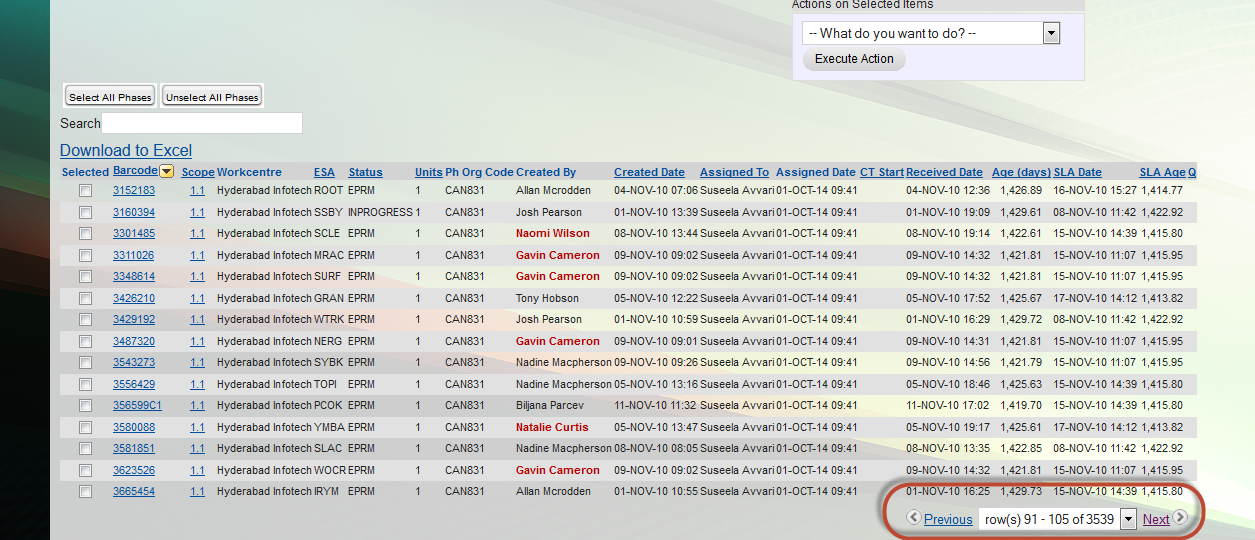
You run the report and all looks well… until you click “Next >” to get the next page!
ApEx report first page
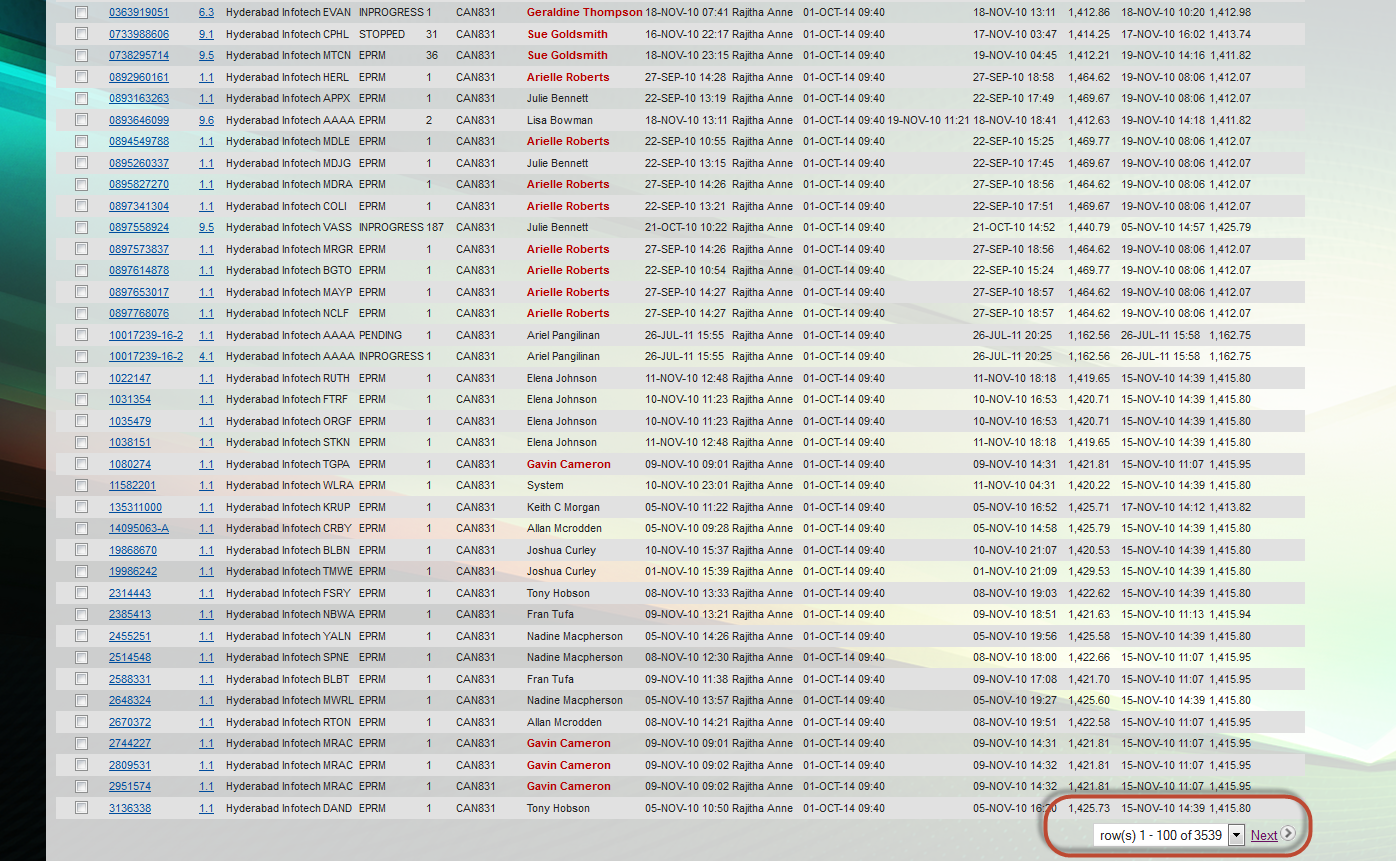
All of a sudden, the number of rows dwindles back down to 15 and it stays that way! Imagine trawling through thousands of rows 15 at a time. How annoying!
Oracle ApEx report next page
Luckily for us, the patch fix is simple. All you have to do is:
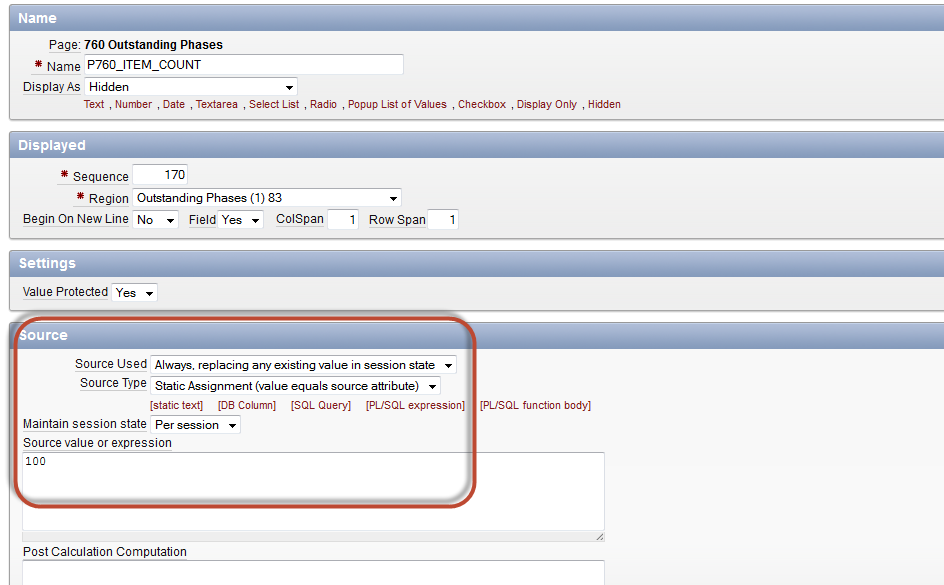
1. Create a Hidden Item for the page where your report is.
2. Under source -> Source Used, set the Source Used to “Always, replacing any existing value in session state.
3. Under Source -> Source Type, leave the value set to “Static Assignment (value equals source attribute).
4. Under Source -> Source value or expression, set the number you would like for the number of rows. In this instance, I set it to 100.
New hidden page item source
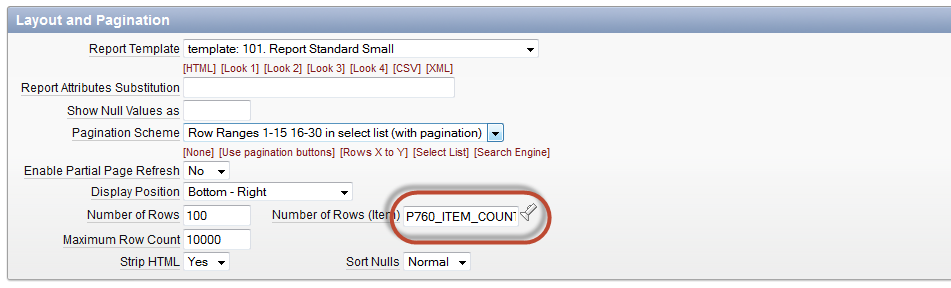
5. Apply changes then go to your report’s Report Attributes – Layout and Pagination. Under Number of Rows (item), enter you hidden item name.
Oracle ApEx report attributes’ Layout and Pagination Number of Rows (Item) value
Quickflix Ltd. (http://www.quickflix.com.au/) is an Australian streaming company offering subscription to a selection of movies and TV shows over a range of smartTVs, games consoles, Blu-ray players, desktops, laptops, mobiles, tablets and other devices. They do their business very badly and is on a constant decline.Streamed titles are very limited and DVDs are often getting lost in transit.
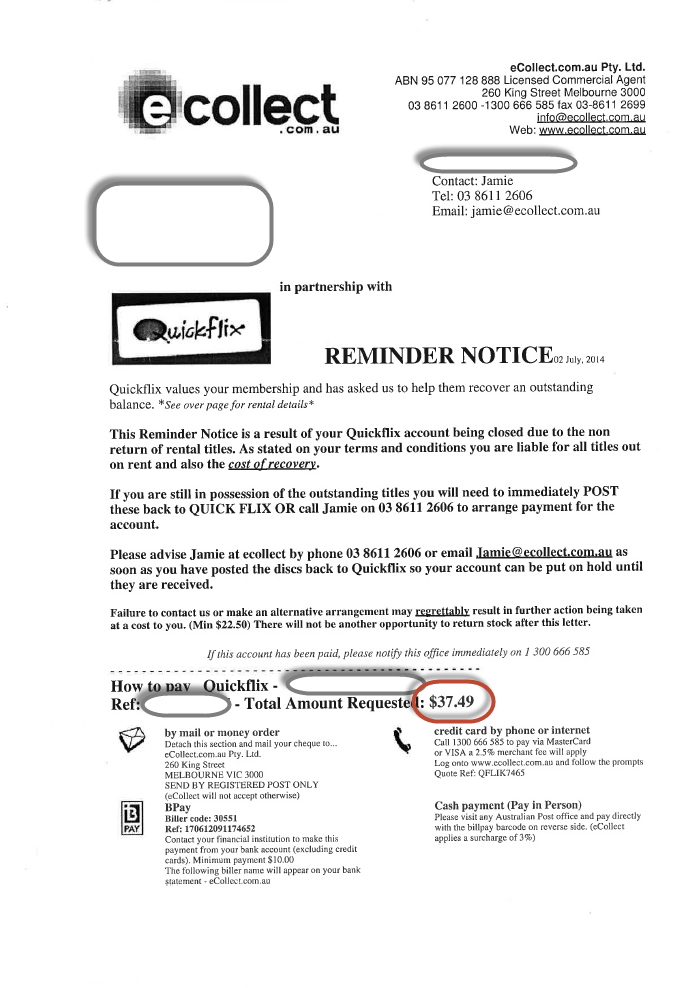
To counter this decline and keep profiting, Quickflix revised their business model and devised a scheme. They devised a scheme to profit on their business model’s weakness – lost DVDs in transit. You see, Quickflix, knows that DVDs they distribute get lost all the time. They also know that it’s not always the customers fault that they get lost. Do they care? Of course not!
It’s a business opportunity. Heck, they are going down anyway, why not go down with guns blazing! Quickflix charge their customers a ridiculous recovery fee in order to profit from a misfortune. They partnered with ecollect.com.au so Quickflix don’t actually have to do the dirty work. They practically send out thousands of these reminder notices to unassuming customers.
Quickflix Reminder Notice
Don’t even think about signing up with these crooks. You have been warned.
I don’t know about you, but when it comes to tools, I’d like to be able to use it whenever I need or want. That’s no different when it comes to smartphones. In my opinion, what’s the point of having a powerful tool if you can’t utilize it to its full capacity? Manufacturers brag about the capabilities of their brand but in actual fact it’s impractical to have these in what’s supposedly a mobile device. No point having a transportable device that’s constantly “chained” to the power point.
The minute you unplug your phone from the socket, it’s like a ticking time bomb. Smartphones are underutilized by its owners because of the fear of draining the battery too quickly and being left in the lurch.
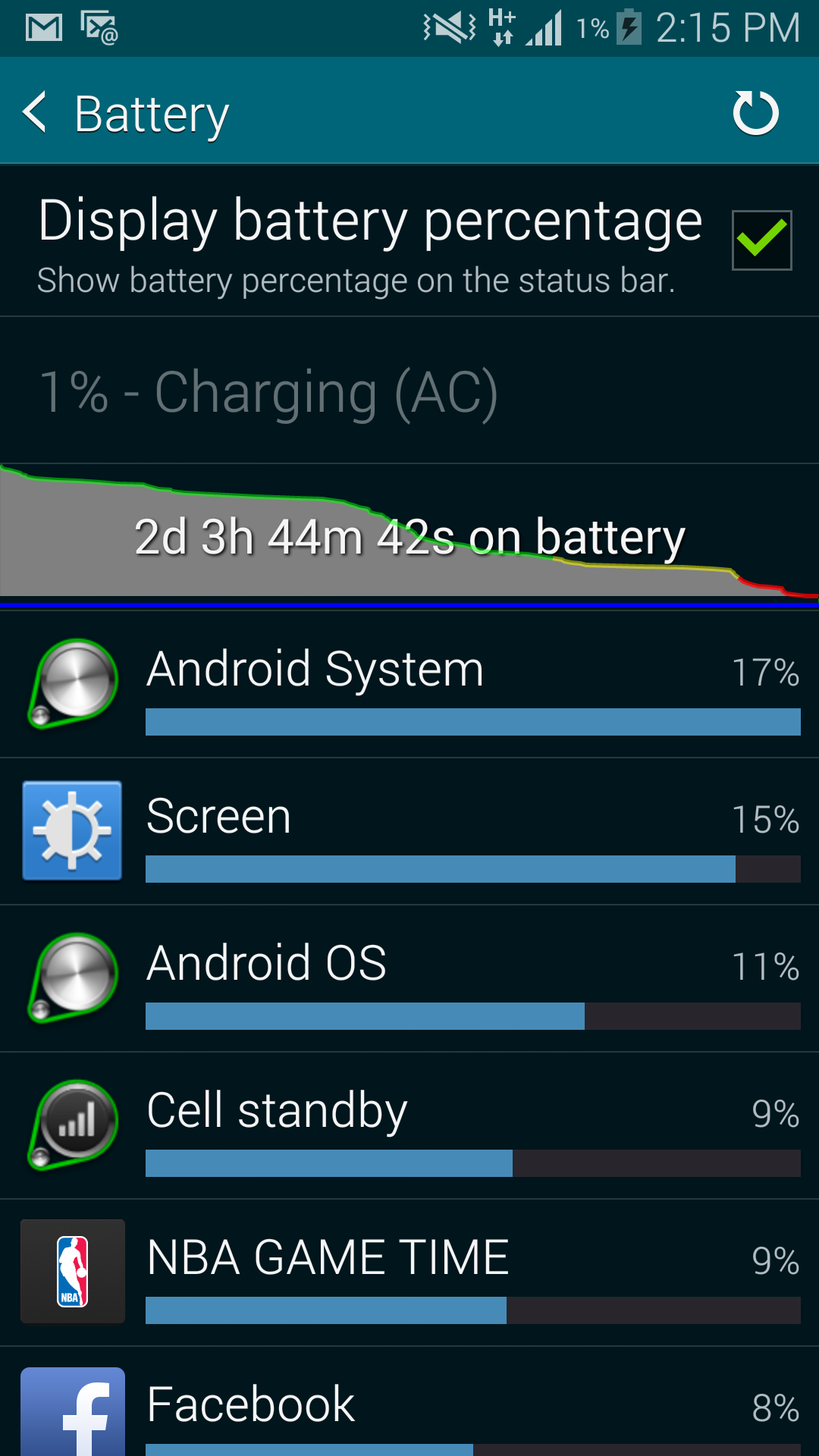
Well, Samsung understands this problem. Take a look at the battery longevity of my S5 under normal day-to-day use. I never have to worry about battery ever again! You even have the option to enable the “Ultra power saving mode” which stretches your device juice even longer. For this feature alone, I give the Samsung Galaxy S5 a 10/10!
If you’re thinking about signing up for a streaming content service in Australia, then I recommend you give Quickflix the “flix”. I’ve been signed up for the service now for over 4 months and I’ve merely seen about 2 movies on DVD and about 5 shows that were streamed.
I joined the service thinking that I will take advantage of my new NBN (fibre) connection and stream shows directly over the internet. I was very disappointed to discover that there are very limited titles available to stream, mostly B grade shows and films that nobody wants to watch.
The movies or shows that I wanted to stream were only available on DVD, which although free to deliver, you have to wait up to 5 days for it to arrive at your doorstep in order to view. You have to wait another 5 days upon returning before Quickflix dispatches the next DVD in your queue. That’s 1 DVD per every 10 days average on the most basic account (1 DVD out at a time).
What’s worse, you have to pay AU$5.99 to stream or get the DVD for the “latest” titles (on top of the AU$14.99/month subscription fee). You’re better off getting the traditional membership at your nearest Civic video franchise.
What’s even worse is that you can’t cancel your membership online (Microsoft style!). You have to call up and be put on hold for about 10 minutes before you get to speak to an operator, get transferred about 2 more times to two different operators, while reintroducing yourself and restating your problem every transfer, before the cancellation was done. That’s over 30 minutes in total on the phone to organise a cancellation.
Thinking the nightmare was over after I made the cancellation, I received a bill for the next month for a service I’m never going to utilise. I even suspended my account for about 1 week prior to the cancellation but because I had a DVD in transit, the cancellation wasn’t finalised against the next billing month. I tried to organise a partial refund but it appears that it was too much to ask on their billing system and got the following email today:
Hi Ariel,
Thank you for contacting Quickflix in relation to the billing on your account.
As per our Terms and Conditions Your membership will not be suspended until you have returned all outstanding DVDs. You will continue to be billed if any outstanding DVDs have not been received back into our library by the billing date.
“Your Subscription Holiday will commence once you have completed this process and returned any outstanding Discs. Please note that your Subscription Holiday will not commence until you have returned all outstanding Discs, and you may continue to be billed if any outstanding Discs have not been received. “
Please be advised that we have reviewed these concerns in conjunction with the information available and in this instance, we unfortunately will not be able to processed a refund on your account.
The time you have paid for whilst on suspension will be credited back to you once your account is reactivated. This is done automatically and ensures that you are being provided with the service you’ve paid for.
We hope the above information helps clarify the suspension option and if we can be of further assistance, please contact us.
Kind regards,
Jessie
Thanks Jessie.
I think its safe to assume that I will never reactivate my Quickflix account. You can keep my 15 bucks.